/prod01/wlvacuk/media/departments/digital-content-and-communications/submitted-news-images/Mr-Speaker-2.jpeg)
/prod01/wlvacuk/media/departments/estates-and-facilities/images/online-reporting.png)
Online Reporting
Access for Repairs, Maintenance and Staff Visits
If you have submitted a maintenance request through the online portal, you will have been advised of the expected response timescale. When a member of the maintenance team arrives to inspect or carry out a repair, there is no need to be concerned if you hear a knock at your door.
Our maintenance and caretaking staff will always knock, identify themselves, and allow you time to answer. If you are not available, authorised staff may still enter your room to inspect or complete the necessary repair. A calling card will be left to let you know that access was required and that work has been carried out.
Planned Maintenance and Inspections
From time to time, contractors or University staff may need to carry out planned maintenance, inspections, or other essential works. In these cases, you will receive an email with at least seven days’ notice, outlining:
- The work being carried out
- The date and time of the visit (where applicable)
- The areas that require access
If you are not present when the visit takes place, authorised personnel may still enter your room to complete the required work. A calling card will be left to confirm that access was gained and to provide details of the visit.
If you spot a repair or need to request service, you can easily report the job online. Types of jobs you can report online include:
|
Air conditioning and heating issue |
Fixtures and fittings issues |
|
Building structure repair |
Kitchen or bathroom repairs |
|
Door or window repair |
External grounds repair |
|
Electrical repair |
Party request |
|
Emergency issue |
Pest control |
Notifications regarding reported jobs will reassure you work is in hand, and there is the opportunity to record feedback about the service received.
If you prefer to speak to staff in your accommodation hub, they will log your request on your behalf.
If you log a job on Planon and you’re not around when our team comes to fix it, no stress — we’ve got you. We’ll leave a calling card in your room letting you know who popped in, why they visited, and the exact date and time the work was carried out.
Check out the user guides and recordings demonstrating how to use the system.
Notifications will be processed from 8am-5pm Monday-Friday
As you probably guessed jobs are prioritised on their urgency, however emergency jobs can be reported to your security team and wardens at your halls so don’t worry you won’t be left in a sticky situation over the weekend, you can contact them on 01902 322106 or through the SafeZone app.
If there’s a problem in your room the team might need access when you're not there, which will be a nice surprise when you come home to a fixed set of drawers. Alternatively if you are in they will give you a knock on the door, but you can check your email so you know when to expect them.
| Level of Priority | Response Time | Problems Reported |
|---|---|---|
| Level 1 | 30 minutes - 4 hours | Emergency Leak, Access Control (doors), Glazing Issue, Suspicious Smell, Fire Safety Equipment, Door Issue, Pipework Issue, Electrical Outage, Gas Smell |
| Level 2 |
up to 24 Hours
|
Room too Hot/Cold, Heating Issue, Kitchen Appliance Issue, Drain Smell, Lights or Sockets Issue (non-emergency). Pull Cord, Sink, Toilet or Shower Issue |
| Level 3 |
24 +Hours |
Building Structure, Mould Removal, Extractor Fan Issue, Pest Control, Glazing issue (Commercial) |
Academic year 2025-26
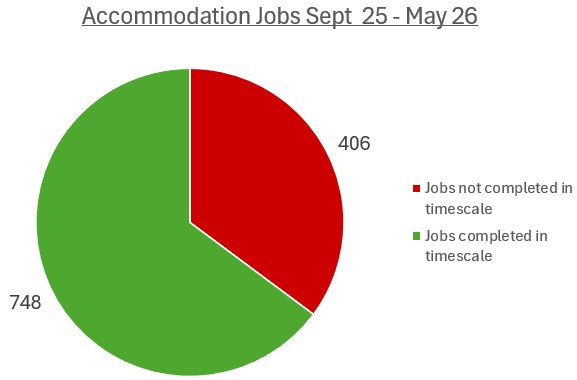
During the 2025-26 academic year, a total of 1,154 maintenance requests were reported through the online maintenance reporting system. Of these, 748 repairs were completed within the target timescale, while 406 repairs exceeded the agreed completion timeframe.
What are we doing to improve this?
The Estates Team is currently reviewing the response and completion timescales for maintenance requests to ensure they remain appropriate and achievable. Any changes to the current process will be communicated once the review has been completed and agreed.
The University is also embedding a new Computer-Aided Facilities Management (CAFM) system within the online reporting process. As development of the system continues, it will provide real-time reporting and tracking information, improve visibility of repair requests and enhance the overall user experience.
In addition, it has been identified that, during parts of the year, some maintenance jobs were not updated or closed correctly within the system. This contributed to a higher number of jobs appearing to exceed their target completion dates. Further staff training has now been completed to ensure repairs are managed and recorded accurately, helping to improve reporting accuracy and performance monitoring.
Academic year 2024 – 25
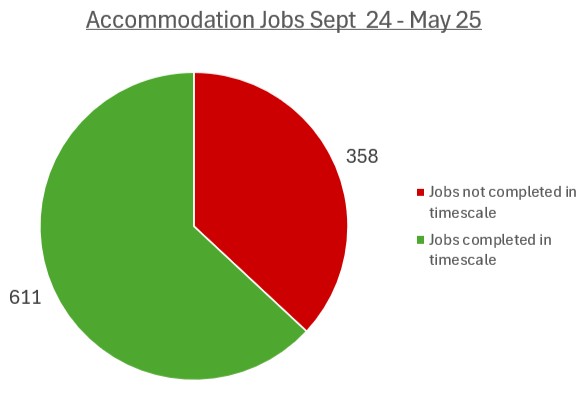
A total of 969 jobs were reported, 611 were completed in timescales and 358 exceeded the timescales
Our Security Services are out and about 24/7.
They also recommend numerous apps of which have many useful features for your safety and welfare. To find out more click here.